How to Create a Lot
Creating a Lot
To create a lot:
• Navigate to Lots → Create Lot
You will be prompted to enter lot details
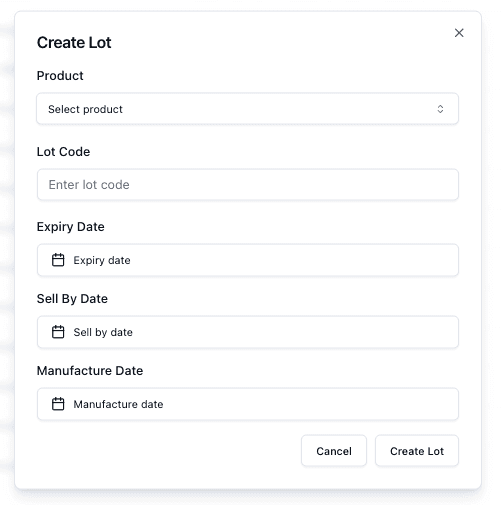
Required Fields
When creating a lot, you must enter:
• Product (SKU)
• Lot Code
These identify the batch and link it to the correct product.
Setting Dates
You can optionally set important dates:
• Expiry Date
• Sell By Date
• Manufacture Date
These dates help control inventory usage and availability.
Submitting the Lot
Once all details are entered:
• Click Create Lot
The lot will then appear in the Lots Page and be tracked as part of your inventory.
Important Notes
• Lot Codes should be unique to avoid confusion
• Dates directly impact lot status and availability
• Missing dates may reduce tracking accuracy
• Ensure the correct product is selected before creating the lot
FAQs
Are all date fields required?
No — only Product and Lot Code are required
Can I edit a lot after creation?
Yes — lots can be updated depending on permissions
