Inserts Overview (Understanding Include/Exclude and Status Options)
What are Inserts?
An insert is an additional item that can be included in orders alongside products.
These are typically lightweight items such as:
• Gift cards
• Thank you notes
• Stickers or promotional materials
Inserts are managed separately from products but still tracked within inventory.
Insert Types
There are different types of inserts depending on how they are used.
Examples include:
• Insert (standard additional item)
• Sticker (specialised insert type)
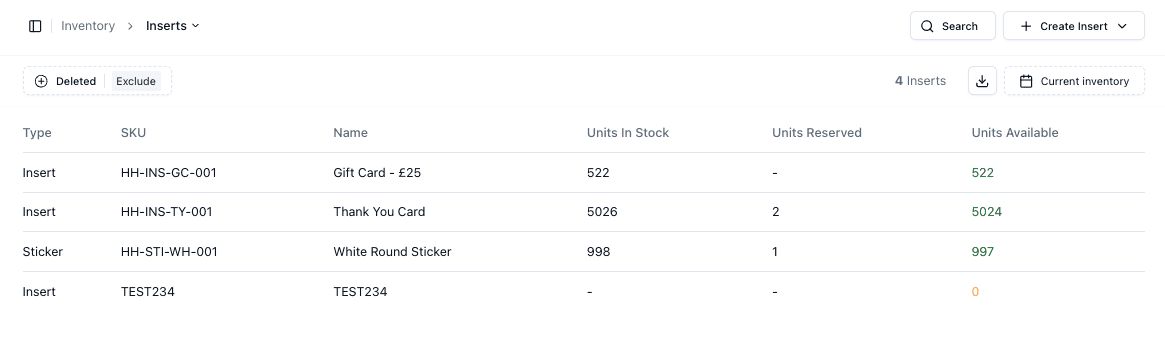
Each insert has its own SKU, name, and inventory tracking.
Include / Exclude Behaviour
You can control how inserts are applied using Include / Exclude filters.
• Include → Shows only active inserts
• Exclude → Hides certain inserts from selection
This allows you to manage which inserts are available for use without deleting them.
Image: Insert Filter
Deleted Inserts
Inserts can be marked as Deleted without being permanently removed.
This allows you to:
• Hide inserts from active use
• Retain historical data
• Restore inserts if needed
You can toggle viewing deleted inserts using the filter options.
Inventory Tracking
Inserts track inventory similarly to products.
You can view:
• Units in Stock
• Units Reserved
• Units Available
This ensures inserts are only used when stock is available
Important Notes
• Inserts are separate from products but still use SKUs
• Include / Exclude does not delete inserts, it only controls visibility
• Deleted inserts can still be viewed and restored
• Inserts must have available stock to be used in orders
FAQs
Can inserts run out of stock?
Yes — inserts follow normal inventory tracking
What is the difference between exclude and delete?
Exclude hides the insert, delete removes it from active use but keeps records
