Warehouse Location Actions
What Actions are Available?
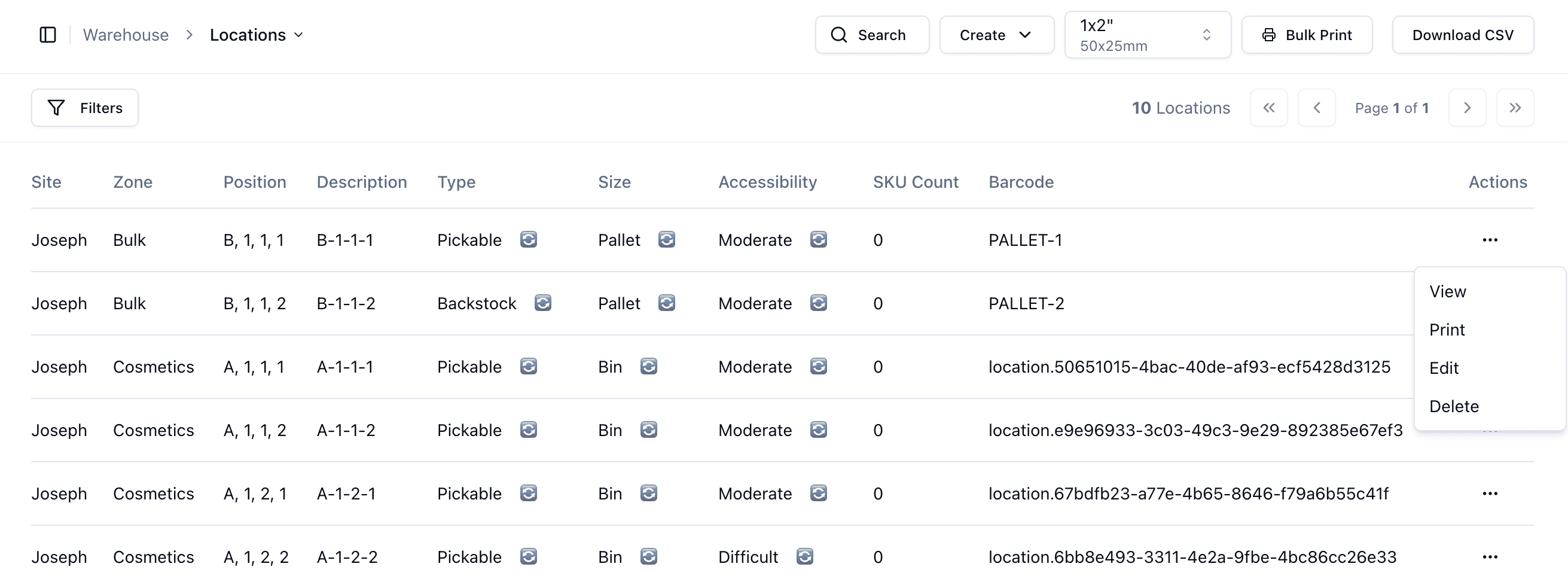
The Warehouse Locations Page includes several actions that allow you to manage warehouse locations directly from the locations table.
Available actions include:
View
Print
Edit
Delete
These actions are accessed from the Actions column on the right-hand side of the table.
View
The View action opens the selected warehouse location in more detail.
From the View page, you can:
See inventory currently assigned to the location
Add inventory directly to the location
View location details
Manage inventory adjustments
This page is useful when investigating inventory placement or manually adjusting stock.
The Print action allows you to print a label for the individual warehouse location.
This is useful when labelling shelving, bins or pallet areas inside the warehouse.
Edit
The Edit action allows you to update the location settings or information.
This may include:
Accessibility
Location type
Description
Other location configuration settings
Delete
The Delete action removes the warehouse location from the system.
Locations should only be deleted if they are no longer used or were created incorrectly.
Important Notes
It is recommended to carefully review locations before deleting or editing them, especially if inventory is already assigned to the location.
